

Moving office equipment requires more planning than placing computers and furniture into boxes. Every monitor, workstation, server, copier and specialty device must be inventoried, protected, transported and returned to the correct location. In New York City, building rules, freight-elevator windows and limited loading access make that coordination even more important.
A well-designed equipment move protects valuable assets and helps employees resume work without searching for devices, cables or furniture. This guide explains how to prepare office equipment for relocation, reduce downtime and avoid the most common moving risks.
What Counts as Office Equipment?
Office equipment includes more than computers. A complete relocation inventory may cover:
- Desktop computers, monitors, docking stations and peripherals
- Servers, network hardware and telecommunications equipment
- Printers, copiers, scanners and mailroom equipment
- Desks, conference tables, seating and modular workstations
- Audio-visual systems and conference-room technology
- File cabinets, records and secure document containers
- Kitchen appliances, vending machines and shared equipment
- Laboratory, medical, studio or other specialty devices
Different assets require different handling methods. A rolling chair does not need the same protection or chain of custody as a server, and a copier may require manufacturer-approved preparation before it can be moved safely.
Start with an Accurate Equipment Inventory
Begin by recording what will move, where it is now and where it belongs at the destination. Each item or grouped workstation should have an owner, origin, destination code and handling requirement.
The inventory is also an opportunity to reduce the move. Identify obsolete technology, damaged furniture, duplicate equipment and records that have reached their approved disposal date. Items that will not fit the new plan can be recycled, liquidated or placed in commercial storage instead of consuming move labor and destination space.
Create a Destination and Labeling Plan
Final floor plans should assign a unique code to every office, workstation, conference room, storage area and equipment location. Use that same code on furniture, reusable crates, computer bags and destination signage.
Labels should identify the destination—not only an employee name. People and departments can change during a relocation, while a clear room or workstation code gives the moving team an objective placement instruction.
How to Prepare Computers and Technology
Technology should be managed as its own workstream. The internal IT team or technology partner should document shutdown, backup, disconnection, reconnection and testing responsibilities before moving begins.
Back Up Critical Data
Complete and verify required backups before equipment is disconnected. A physical relocation should never be the only event separating important business data from a failure.
Document Connections
Photograph or diagram complex connections and label cables by device and destination. Pack accessories with the equipment they support whenever practical. Small components should travel in closed, clearly identified containers rather than loose on carts.
Use Purpose-Built Protection
Monitors, computers and sensitive devices should be secured in padded cases, anti-static protection or manufacturer-approved packaging. Heavy equipment needs carts, lifts and tie-down systems designed for its weight and dimensions.
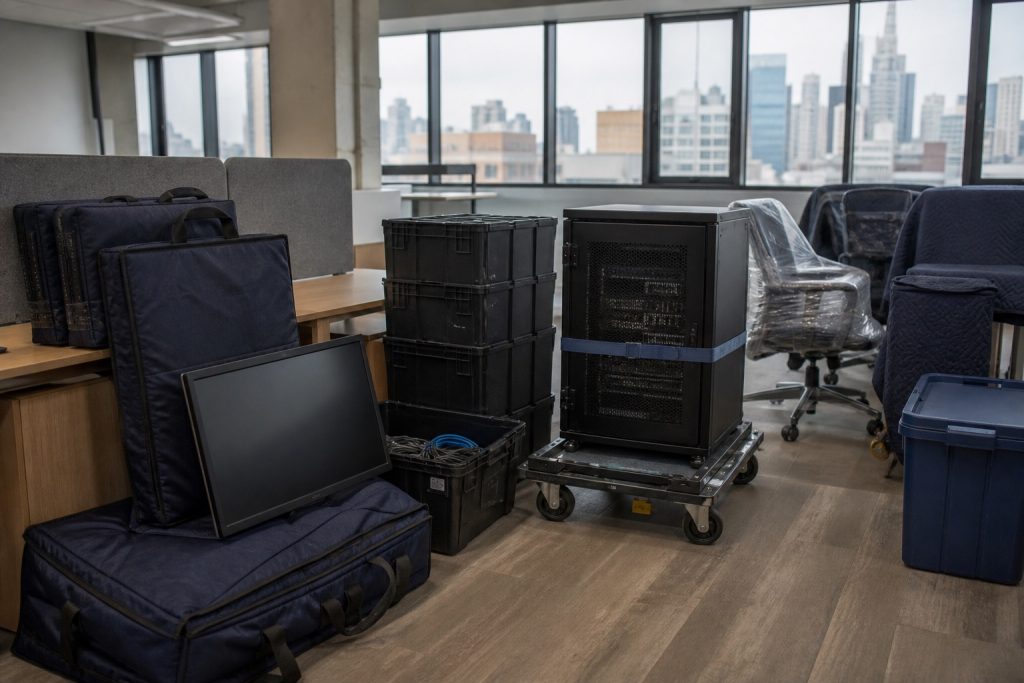
Test the Destination Before the Move
Confirm that power, network service, telecom connections and equipment locations are ready before devices leave the origin. Eagle Transfer’s technology relocation services can be coordinated with the physical move so equipment arrives in the correct sequence.
How to Prepare Office Furniture
Compare the existing furniture inventory with the approved destination plan. Measure elevators, doorways and final rooms, and identify furniture that must be disassembled. Keep fasteners and hardware in labeled containers tied to the correct furniture system.
Protect finished surfaces with reusable pads, stretch wrap or other appropriate materials. Glass, stone and specialty finishes may require crates or custom handling. Modular workstations should be disassembled and reinstalled by teams familiar with the manufacturer and layout.
Protect Copiers and Specialty Equipment
Large copiers, production printers, medical devices and other specialized equipment may have transport locks, fluid-removal requirements or manufacturer procedures. Confirm these requirements early and decide whether the vendor must prepare or recommission the unit.
Record model and serial information before the move. Note each item’s weight, dimensions, center of gravity and approved lifting points so the crew can plan the correct route and equipment.
Coordinate NYC Building Requirements
Many Manhattan properties restrict commercial moves to evenings or weekends. Both buildings may require certificates of insurance, freight-elevator reservations, loading-dock appointments and protection for floors, walls and elevators.
Walk the full equipment route at the origin and destination. Check doorway clearances, elevator capacities, loading areas, ramps, stairs and security procedures. Resolve access conflicts before the scheduled move window begins.
Plan the Move Sequence to Reduce Downtime
Equipment should move in the order needed to restore operations. Infrastructure and shared systems may need to arrive before employee devices. A phased move can keep critical departments working while other areas transition.
Build time into the schedule for reconnection, testing and troubleshooting. A workstation is not complete when it reaches the correct desk; it is complete when the required equipment is connected, tested and ready for use.
Common Office Equipment Moving Mistakes
- Moving equipment that is obsolete or incompatible with the new office
- Using employee names instead of stable destination codes
- Packing cables and accessories separately from their devices
- Assuming elevators or loading docks will be available
- Disconnecting technology before backups are verified
- Failing to test power and network service at the destination
- Ignoring manufacturer requirements for specialty devices
- Scheduling no time for post-move testing and adjustments
Office Equipment Moving Checklist
- Complete the equipment and furniture inventory
- Confirm what will move, store, recycle or liquidate
- Approve destination floor plans and codes
- Verify backups and technology shutdown procedures
- Document devices, cables and specialty handling needs
- Confirm building access, COIs and elevator reservations
- Prepare appropriate cases, pads, crates and carts
- Sequence infrastructure, shared equipment and workstations
- Assign reconnection and testing responsibilities
- Complete a destination readiness review
Frequently Asked Questions
Who should disconnect office computers before a move?
The company’s IT team, technology vendor or an approved relocation specialist should manage disconnection requirements. Responsibilities should be documented so devices are not shut down or moved before backups and destination systems are ready.
Can office furniture and computers move together?
They can be part of the same coordinated relocation, but each asset type needs appropriate protection and sequencing. Technology is often handled as a separate workstream within the overall move plan.
How should monitors be packed?
Monitors should be disconnected, labeled and secured in padded reusable cases or suitable protective packaging. Screens must be protected from pressure, impact and shifting during transport.
What happens to equipment that is not needed immediately?
Managed commercial storage can hold furniture, technology and other assets until the destination is ready. An inventory system makes it easier to schedule staged delivery later.
Move Office Equipment with an Experienced NYC Team
Eagle Transfer has coordinated complex commercial relocations in New York City since 1974. Our team can integrate equipment handling with project management, packing, transportation, furniture installation, storage and office closeout.
Contact Eagle Transfer to build an office equipment moving plan around your inventory, buildings and operating schedule.